I can only see the one sentence ‘Learn helpful…’ and then the ‘Spread the word’ text, but no video or anything looking like there is supposed to be a video.
Can someone please tell me where the videos for these tips are?
I learned a lot from this tutorial and put together a similar composite with photos of my daughter playing volleyball. It turned out great! Thanks for teaching me how to do it. I can’t wait until she sees it in the morning
wow thanks for the idea and your perfect timing, I have been asked to do one for the CFL (Canadian Football League) and this is exactly the inspiration I needed!
This is great! I saw a similiar layout in a College Football Program and was wonder how to make the grid pattern layout. The video and lesson where easy to follow and worked out perfectly, I’ll use this technique in our high school football program. Thanks so much.
Hey, this isn’t related to this particular tutorial but how can I complete a new paint job on a car in photoshop? Using the eyedropper tool to acquire accurate colors from website with vehicles.
Thanks alot about this information I have one sit they can give us a lot of Logos about Clubs Logos Design with high resolution Its free gift for you 🙂
FIFA World Club Logos
Other Clubs Logos Design
Italian Clubs Logos Design
American Clubs Logos Design
I am just a little past being a CS3 Extended Photoshop virgin and am trying to duplicate your Great tutorial ( since it didn’t look too hard). For some reason I keep making a “shape layer” when I begin drawing the lines, instead of drawing them on the background like you did. I also get a “Could not use magic wand because target is a fill layer” when I attempt to continue with the shape layer. I am using a PC version of Photoshop. Could you tell me where I am going wrong?
Jerry
PS
please don’t what is wrong is that your using a PC!
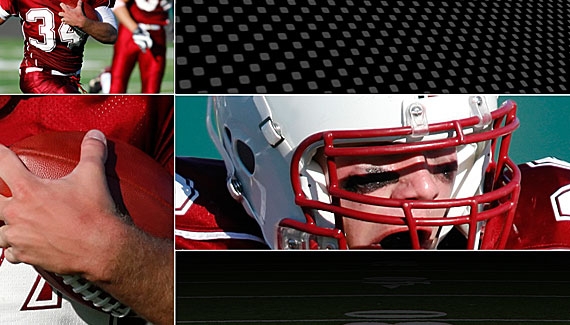



Video not found at http://www.planetphotoshop.com/ready-for-some-football.html
Corey… YOU DA MAN!! I do some advertising for youth sports at my local YMCA, and this gave me some great new ideas to try!
Great idea Corey, i make one with hockey
Some problem with your webpage, two vidéo open at the same time. (google chrome) with internet explorer the vidéo dont work.
video not found error with explorer…
The video isnt working with internet explorer.
Amazing stuff
and yeah on chrome and firefox there are 2 videos
Same problem. Ad works but two video players without the video.
Try google chrome the video work but two video play, just close one.
Works with firefox but two videos players too, so great tutorial .
Where is the video?
I can only see the one sentence ‘Learn helpful…’ and then the ‘Spread the word’ text, but no video or anything looking like there is supposed to be a video.
Can someone please tell me where the videos for these tips are?
Thank you
Jacques
Theres a problem with the video playing at the same time as the vid in the toolbar on the right hand side.
video not found error with explorer…
I can’t wait to make my next ad, a chore I never look forward too until now!
cool
video worked great for me
love what you do keep it up
Awesome 😀 – Vid works fine on Safari in windows…
Great tut. Video works fine with Firefox. Thanks
I learned a lot from this tutorial and put together a similar composite with photos of my daughter playing volleyball. It turned out great! Thanks for teaching me how to do it. I can’t wait until she sees it in the morning
Love your work…
you are a hero man.thanks a lot we wait more.video is loaded well on firefox browser
very nice tutorial we wait more
USE MOZILLA FIREFOX BROWSER
THIS IS A FANTASTIC IDEA
wow thanks for the idea and your perfect timing, I have been asked to do one for the CFL (Canadian Football League) and this is exactly the inspiration I needed!
This is great! I saw a similiar layout in a College Football Program and was wonder how to make the grid pattern layout. The video and lesson where easy to follow and worked out perfectly, I’ll use this technique in our high school football program. Thanks so much.
Hey, this isn’t related to this particular tutorial but how can I complete a new paint job on a car in photoshop? Using the eyedropper tool to acquire accurate colors from website with vehicles.
Thanks alot about this information I have one sit they can give us a lot of Logos about Clubs Logos Design with high resolution Its free gift for you 🙂
FIFA World Club Logos
Other Clubs Logos Design
Italian Clubs Logos Design
American Clubs Logos Design
Dwnloads from this linke direct :
http://www.ebooks.allnewthings.com/Downloads/Logos/Clup%20Logos/Other%20Clups/Other%20Clups.rar
OR
http://www.ebooks.allnewthings.com/
GREAT IDEA!!!
Great idea i loved it 🙂
european football is way better than yours 😛
I’m going to use this for one of my ads… THANKS!!!
I am just a little past being a CS3 Extended Photoshop virgin and am trying to duplicate your Great tutorial ( since it didn’t look too hard). For some reason I keep making a “shape layer” when I begin drawing the lines, instead of drawing them on the background like you did. I also get a “Could not use magic wand because target is a fill layer” when I attempt to continue with the shape layer. I am using a PC version of Photoshop. Could you tell me where I am going wrong?
Jerry
PS
please don’t what is wrong is that your using a PC!