Sponsored by the National Association of Photoshop Professionals. Learn More

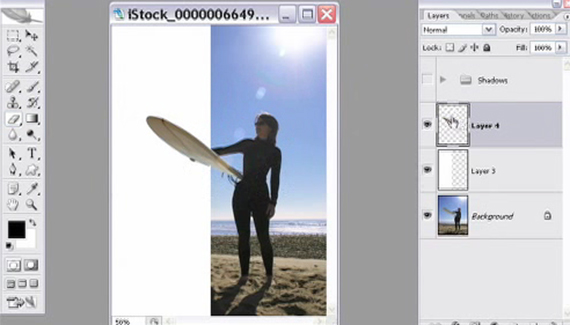
Over The Border


Matt Kloskowski shows us how to make a photo pop out of its border.

Matt’s new instructional DVD “Automating Photoshop CS2″ is now available on PhotoshopVideos.com.

Spread the word:
  • Digg
  • del.icio.us
  • Facebook
  • Twitter
  • NewsVine
  • Technorati
  • BlinkList
  • Design Float
  • Mixx
  • Reddit
  • Slashdot
  • SphereIt
  • StumbleUpon
  • LinkedIn
  • MySpace
  • Fleck
  • Netvibes

2 Comments

  1. Photoshop Video Tutorials | Photoshop | Best collection of free video tutorials on software and internet applications Pingback on — April 24, 2008 @ 12:44 pm

    [...] photographs  (layersmagazine.com) Get Warped with Photoshop CS2  (rookiedesigner.com) Over The Border : make a photo pop out of its border  (planetphotoshop.com) Give Your Photo an Antique Look :   (planetphotoshop.com) Add [...]

  2. Need to remove a background from your photo? | EasyDigitals.com Pingback on — September 19, 2008 @ 10:08 am

    [...] Partial extraction for putting heads over magazine text or photos coming off the page. Click here.  [...]

RSS feed for comments on this post. TrackBack URI

Leave a comment

Adding Keywords to Multiple files

In Bridge, you can add keywords to images to make searching for pictures a little less cumbersome. You don’t, however, want the process to become tedious as well. By either Command-clicking (PC: Ctrl-clicking) or Shift-clicking on images, you can select multiple files inside Bridge. Once you have the files selected, you can go to the Keywords panel and turn on any keyword you like. This will apply the keyword to all of the files that you have selected. It takes away a little bit of the pain of categorization, but just a little.

Read More Tips

Tip of the Day
 
 
Kelby Training