Sponsored by the National Association of Photoshop Professionals. Learn More
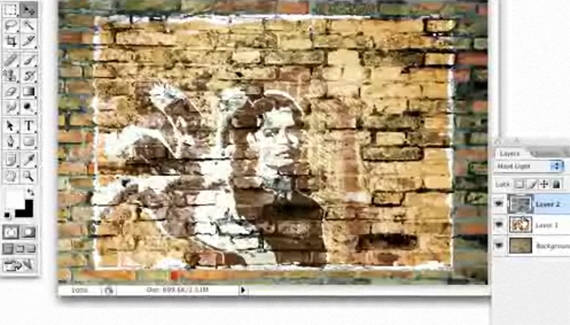
Here we will make a graphic appear as though it has the texture of a brick wall.
Corey Barker is Executive Producer of PlanetPhotoshop.com and is an Education and Curriculum Developer for the National Association of Photoshop Professionals. He has earned numerous Photoshop awards in design and illustration and has contributed writing to Photoshop User Magazine and PhotoshopElementsUser.com. Corey has also made numerous appearances on the highly rated podcast, Photoshop TV.
RSS feed for comments on this post. TrackBack URI
Corey shows you how to create a 3D animation form 2D elements using Photoshop CS4 Extended. Click here to download a .MOV file with the final version of this animation.
This effect was discovered by a ‘happy accident’ and uses the 3D features inside of Photoshop CS4 Extended.
Further experiments into what you can do with texture images in Photoshop.
Create and animate a 3D wireframe using Photoshop CS4 Extended.
Sometimes our best creations happen by pure experimentation and accident. Sitting in front of a Photoshop file, you are 40 History States in, and then it happens…magic! You really want to be able to get back to that moment. To do so, make sure that you turn on the History Log checkbox in the General Preferences (Photoshop>Preferences>General [PC: Edit>Preferences>General]). You can save the information as metadata, as a separate text file, or both!
Neil said on — July 10, 2008 @ 5:17 pm
Fantastic technique this. Thank-you.
Krystel said on — November 1, 2008 @ 7:50 am
Nice, another genius technique from the Photoshop Genius.
Leroy said on — March 3, 2009 @ 1:38 pm
NICE
TraumaHound said on — August 23, 2009 @ 3:28 pm
Sometimes the simplest tricks give the best results. I used this guide for a District 9 related wallpaper I put together. Really improved the graffiti-look I was going for. Thanks!
56 Absolutely Brilliant and Intriguing Photoshop Video Tutorials | Photoshop Tutorials Pingback on — September 4, 2009 @ 1:56 pm
[...] Graphic Texture Make a graphic appear as though it has the texture of a brick wall. [...]
56 Absolutely Brilliant and Intriguing Photoshop Video Tutorials | Technology you can trust here... Pingback on — September 5, 2009 @ 1:02 am
[...] Graphic TextureMake a graphic appear as though it has the texture of a brick wall. [...]
56 Absolutely Brilliant and Intriguing Photoshop Video Tutorials « Photoshop.vn – Your Design Resource Pingback on — September 5, 2009 @ 6:09 am
[...] Graphic Texture Make a graphic appear as though it has the texture of a brick wall. [...]
56 Absolutely Brilliant and Intriguing Photoshop Video Tutorials | Fulldigi Pingback on — September 9, 2009 @ 5:40 am
[...] Graphic TextureMake a graphic appear as though it has the texture of a brick wall. [...]
56 Absolutely Brilliant and Intriguing Photoshop Video Tutorials | Download E-Books Free Video Training Courses Softwares Pingback on — September 14, 2009 @ 4:56 am
[...] Graphic TextureMake a graphic appear as though it has the texture of a brick wall. [...]