Sponsored by the National Association of Photoshop Professionals. Learn More

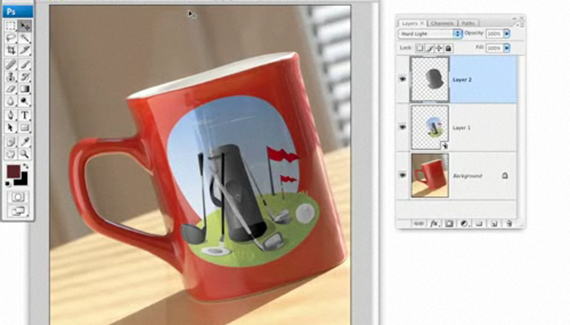
Graphic on Mug


Applying illustrated artwork to a photo realistically.

Corey Barker is Executive Producer of PlanetPhotoshop.com and is an Education and Curriculum Developer for the National Association of Photoshop Professionals. He has earned numerous Photoshop awards in design and illustration and has contributed writing to Photoshop User Magazine and PhotoshopElementsUser.com. Corey has also made numerous appearances on the highly rated podcast, Photoshop TV.

Spread the word:
  • Digg
  • del.icio.us
  • Facebook
  • Twitter
  • NewsVine
  • Technorati
  • BlinkList
  • Design Float
  • Mixx
  • Reddit
  • Slashdot
  • SphereIt
  • StumbleUpon
  • LinkedIn
  • MySpace
  • Fleck
  • Netvibes

13 Comments

  1. Felix said on — April 21, 2008 @ 8:32 am

    Thanks man!!

  2. Mitzs said on — April 23, 2008 @ 9:52 pm

    I found it Corey, Look forward to some more! Thanks

  3. Jim said on — April 24, 2008 @ 12:57 pm

    Great tuorial! minor adjustments making all the difference.
    Thanks

  4. Caity said on — May 26, 2008 @ 4:33 am

    AMAZING. I love your tutorials. They are utter brilliance!
    So helpful and explained so well!
    Thank you so much.

  5. marizmendi said on — July 16, 2008 @ 9:09 am

    Simple and brilliant…Excellent..!

  6. Nathan said on — December 18, 2008 @ 3:48 pm

    Very nice tutorial, interesting to see how you’ve done this. Very helpful and explained very well, BIG Thank you from canada

  7. raines1 said on — December 27, 2008 @ 10:14 pm

    hoi great tutorial, is there anyway tha i can download this tutorial?

  8. 56 Absolutely Brilliant and Intriguing Photoshop Video Tutorials | Photoshop Tutorials Pingback on — September 4, 2009 @ 1:57 pm

    [...] Graphic on Mug Applying illustrated artwork to a photo realistically. [...]

  9. 56 Absolutely Brilliant and Intriguing Photoshop Video Tutorials | Internet Marketing Tips and Strategy To Make Money Online Pingback on — September 4, 2009 @ 6:24 pm

    [...] Graphic on MugApplying illustrated artwork to a photo realistically. [...]

  10. 56 Absolutely Brilliant and Intriguing Photoshop Video Tutorials | Technology you can trust here... Pingback on — September 5, 2009 @ 1:02 am

    [...] Graphic on MugApplying illustrated artwork to a photo realistically. [...]

  11. 56 Absolutely Brilliant and Intriguing Photoshop Video Tutorials « Photoshop.vn – Your Design Resource Pingback on — September 5, 2009 @ 6:09 am

    [...] Graphic on Mug Applying illustrated artwork to a photo realistically. [...]

  12. 56 Absolutely Brilliant and Intriguing Photoshop Video Tutorials | Fulldigi Pingback on — September 9, 2009 @ 5:40 am

    [...] Graphic on MugApplying illustrated artwork to a photo realistically. [...]

  13. 56 Absolutely Brilliant and Intriguing Photoshop Video Tutorials Pingback on — September 17, 2009 @ 9:24 pm

    [...] Graphic on MugApplying illustrated artwork to a photo realistically. [...]

RSS feed for comments on this post. TrackBack URI

Leave a comment

Select with color channels

Sometimes, targeting a specific color chan-nel can help create a much better selection, especially if there are distinct color differences you can take advantage of. In this example, the same diagonal move with the Quick Selection tool resulted in a much better selection of the heart when it was applied only to the Red channel in the Channels panel (Window>Channels).

Read More Tips

Tip of the Day
 
 
Kelby Training