Sponsored by the National Association of Photoshop Professionals. Learn More
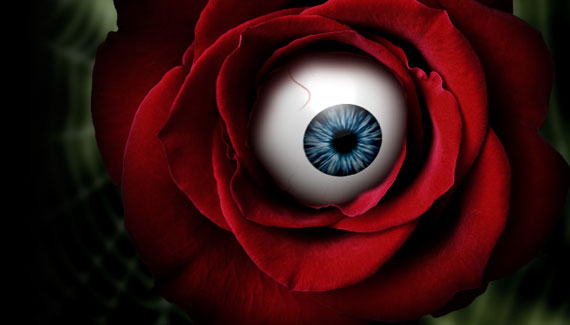
Here is the second part of Corey’s spooky Halloween tutorial where he shows how to composite 3D object with 2D photos. Watch if you dare!

RSS feed for comments on this post. TrackBack URI
As a special Valentine’s Day bonus, here is a cool 3D technique for getting realistic foil balloon. All from scratch!
Corey shows you how to re-create the graphic effect from the new Bourne Legacy movie poster. With an extra twist!
Corey has a cool trick for creating a flare brush and see how one effect can lead to another.
See how you can add some subtle touches to give that green screen studio shot the Hollywood treatment.
If you have a multilayer composition and you
want to apply an effect to all the layers at once, don’t flatten the layers–use a composite layer instead. Hide the layers you want excluded, and press Shift-Command-Option-E (PC: Shift-Ctrl-Alt-E). A new layer will be created at the top containing a merged copy of all the visible layers.
Another option is to create a new layer at the top of the stack and make it active. Command-click (PC: Ctrl-click) each layer you want to include to make those layers active, as well. Press Option-Command-E (PC: Alt-Ctrl-E).
by Colin Smith
Evil Eye For Beauty! Part 1 | Effects Tutorials | Planet Photoshop Pingback on — October 28, 2011 @ 3:07 pm
[...] part Halloween tutorial Corey shows how to composite 3D object with 2D photos. Watch if you dare! Click here to watch Part 2 of this [...]
Henk van Vugt Fotografie » Evil Eye For Beauty! Part 2 Pingback on — October 28, 2011 @ 3:44 pm
[...] Here is the second part of Corey’s spooky Halloween tutorial where he shows how to composite 3D object with 2D photos. Watch if you dare! Continue reading → [...]

wayne said on — October 28, 2011 @ 4:01 pm
another great tutorial corey. wasn’t expecting the ending. now i got to change my pants lol.
Victor said on — October 28, 2011 @ 4:45 pm
Loved it. I have to rank you right up there with Andrew Kramer as a kick ass teacher. Very cool ending.
V
Ged said on — October 28, 2011 @ 4:50 pm
Very funny. You got me for a second with that ending. You are also encouraging me to explore what I have been putting off which is exploring PS’s 3D.
Evil Eye For Beauty! Part 2 | Web Design Blog | Web Design Articles,Tutorials & News Pingback on — October 28, 2011 @ 5:42 pm
[...] Follow the link to the original message Evil Eye For Beauty! Part 2 [...]
Rich said on — October 28, 2011 @ 6:17 pm
Very cool tutorial Corey… I need to boos up my ram so I can try some of your 3d tricks.
Loved the ending too . . .
Madenda said on — October 29, 2011 @ 7:00 am
very nice tutorial, at the end you scared the hell out of me
Evil Eye For Beauty! Part 2 | CS5 Design Pingback on — October 29, 2011 @ 4:41 pm
[...] Halloween tutorial where he shows how to composite 3D object with 2D photos. Watch if you dare! Continue reading → Planet Photoshop Tagged with: Beauty • Evil • Part If you enjoyed this [...]

Marko said on — October 30, 2011 @ 6:57 pm
One your best Corey..THANKS!
Christopher said on — October 31, 2011 @ 8:09 am
change my pants as well thanks Cory scar the crap out of me.
Highly Recommended « vollgemaiert Pingback on — October 31, 2011 @ 8:40 am
[...] Evil Eye For Beauty! Part 2 [...]
Schnellman said on — October 31, 2011 @ 9:50 am
@Victor – You’re right. My 2 favorite instructors – Andrew Kramer and Corey Barker!
Anita Baas said on — November 2, 2011 @ 2:02 pm
Nice eye! It looks really real! very nice!
Joe said on — November 5, 2011 @ 7:57 am
This is the scariest tutorial video of all times. LOL
Khoa said on — November 10, 2011 @ 10:55 am
dang you, i jumped out at the end and my heart now still beating fast, my hands are shaking… dang you…