
Color Theory 101, Part 1
You may never think about color when you design. You may just think what looks good is what is good. Well think again, because it goes much deeper than that.
This week I want to begin talking about color theory. Before I do, I want to stress that some of this is hard and true “Color Theory” as it has been written for the past 100 years. Some of it is my own personal opinion about color. As an artist we must rely on intuition as much as we rely on theory and practice. It’s like a musician; you can teach them all the music theory you want, buy you should never “train-out” their ear. That’s what makes them an artist. Let’s begin this week by talking about some really simple ideas about color and then move on later to more complex ideas, psychology and practice.
I am going to introduce you to a term in color theory called “analogous color”. What this means is that you have a series of colors that are the same hue, but a different shade or saturation value. Look at the image below to see what I mean.
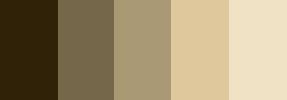
Here is a series of brown colors going from a dark shade to a light one. You should be able to feel a sense of something with this color scheme, but we will talk about that later. What we have here is a series of analogous colors. Now brown isn’t the best example, so let’s look at blue.

Here we have the same series, but with blues. Now, analogous colors can be any hue. If you were using a greyscale version, they would go from black to white through a series of grays. Technically, black and white are not colors per se, but you get the idea right?
So why do you care? Well, you care because the values you choose in your color scheme whether your scheme is for print, the web, or anything is vitally important. Choosing analogous color schemes is very useful for tying together elements in a layout. You can use it to evoke a sense of structure, simplicity and sophistication. It is also useful as an underlying color scheme, for which elements can compliment it. We will talk about complimentary colors later, but think about how often you see combinations of blue and orange, or blue and yellow on the web. Those colors are complimentary to one-another.
The level of saturation in color is important in making sure your color scheme works. Take a look at the image below.
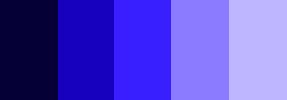
This is the blue image that has been completely saturated. I used the Hue and Saturation command in Photoshop to do this. See how different it feels from this next image.

The first image is not my idea of sophistication. Typically, web sites and print material that are trying to evoke calm, structure and maturity use soft, desaturated colors. Full saturation is sometimes useful for work that is aimed at younger folks.
Just for clarity here are the brown images to look at.
The saturated one:
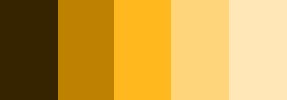
The desaturated one:

So that is your first taste of color theory. We will continue to talk about this and how to work with color in Photoshop in the next few columns.


Thank you. Am looking forward to more color theory information.
I think this is teaching indeed.
Well-presented. It’s always enlightening to go back to basics.
I think the example for analogous is more of an example of monochromatic… an analogous color scheme tends to refer to different hues that are next to each other on the color wheel (red, yellow, and orange for example).
thank you!
I founded your site from psdtuts.com. your color concept userfull fot me 🙂
Man! Amazing article.
Be free today.
I am finding for color combination. I have so much problem in color combination. This article gives me a nice idea about color..
Thanks
Great job!