Cory, your the best i’ve ever seen , love this mosaic tut. with your help im learning photoshop , just wanted you to know you have just replaced my former favorite
Bert Monroy he’s now # 2 thank and keep doing what you do
Awesome tut bud. You always seem to get my “creativity wheels” turning. I am astounded at how you seem to be always thinking outside the box and seldom use traditional design methods on anything you create. Kudos for another great tut, many of my best designs owe you a commission!
Right now I am in the process of learning how to create websites using both photoshop and dreamweaver. I have bought the kelby training photoshop to dreamweaver dvd and was wondering if you could recommend any similar products from kelby that may go more in depth…?
Great tutorial Corey. Your ideas seem endless and your tutorials are always superb. I agree with Marino re making a tutorial about a realistic reflective glass sphere. Thanks.
thanks for all the info. one question a photographer friend was trying to tell me about CS5
that I could remove Tourists from a photo I took at the Vatican in Rome not using C Aware but layers?
thanks
Ive just bought a book of which you’re co-author and omg its amazing 🙂 im already in love with it:) well its written in polish so i dont know whats translation of a tittle into english. I just must say that i found your tutorials very useful too so thank you for your work:]
this is a very helpful tutorial. However, I have a question for you. Chris Brown has a video (“I Can Transform Ya’) in which there is a mosaic effect being used. Can you inform me on how to achieve the effect that he illustrates on this link: http://www.youtube.com/watch?v=BCq1xaNiAeQ
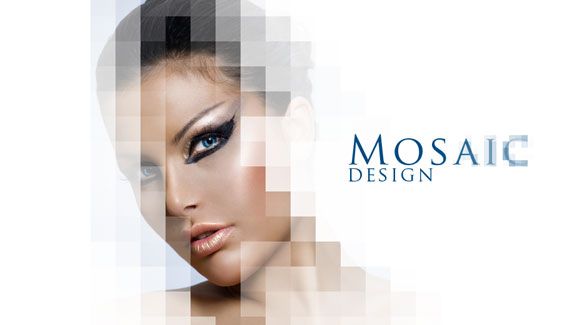



I like the effect .. am big fan ! Your tutorials are very useful .. Especially for people like us , Love PS … thanks
Cory, your the best i’ve ever seen , love this mosaic tut. with your help im learning photoshop , just wanted you to know you have just replaced my former favorite
Bert Monroy he’s now # 2 thank and keep doing what you do
Amazing.
tnx for sharing
Great tutorial, as usual 🙂
Corey once again another greay tutorial……thanks a lot.
pls considere to make a tutorial about a clear ball or cristal ball whatever…..
Awesome tut bud. You always seem to get my “creativity wheels” turning. I am astounded at how you seem to be always thinking outside the box and seldom use traditional design methods on anything you create. Kudos for another great tut, many of my best designs owe you a commission!
Right now I am in the process of learning how to create websites using both photoshop and dreamweaver. I have bought the kelby training photoshop to dreamweaver dvd and was wondering if you could recommend any similar products from kelby that may go more in depth…?
I don’t think I have ever even seen the mosaic filter. Great tutorial.
It’s about time that you did some photo designs and got away from all the lettering and logo stuff
you always amaze me all the time
keep up the good work you do and keep coming with all the good stuff that you do
Realy like the outcome and simple to follow.
Another great tutorial! Let keep them coming!
Great tutorial Corey. Your ideas seem endless and your tutorials are always superb. I agree with Marino re making a tutorial about a realistic reflective glass sphere. Thanks.
Great tutorial Corey. Your ideas seem endless. I agree with Marino’s comment on considering creating a tutorial on a realistic glass sphere. Thanks.
You’re so talented! Thanks for another great tutorial!
Hey Nice tutorial but can you please make suggestion as to where we can get these stock photos or similar one?
Again beautiful, thanks you!
realy,realy nice tutorial, thanks 😉
Thanks, really good review of smart objects for me
Corey, keep going on!
Corey, it’s great!
Amazing!
Thank you for beautiful tutorial ….
You make photoshop look so easy! Your combination of tools and options are great.
You show how to use photoshop on a very creative way. Thanks!
Corey,
This tutorial cuts out about half way through, Just after the layer pallet is dragged out, it resets?
thanks for all the info. one question a photographer friend was trying to tell me about CS5
that I could remove Tourists from a photo I took at the Vatican in Rome not using C Aware but layers?
thanks
Great tutorial, so simple but very cool.
Where did you get the streak.psd image from?
wow… nice design n tutorial..thnx a lot
(http://indyastaric06.student.ipb.ac.id)
Ive just bought a book of which you’re co-author and omg its amazing 🙂 im already in love with it:) well its written in polish so i dont know whats translation of a tittle into english. I just must say that i found your tutorials very useful too so thank you for your work:]
Thanks Corey for this Great tutorial
your e-mail pls
thanks for sharing the tutorial. nicely done!
Great effect and great tutorial Corey!
I love learning and teaching Photoshop and you’re a tremendous inspiration for all things creative.
Great tutorial, as always! I like your methods how to teach the stuff! I buys CS5 yesterday, and with u i learned very much in only about 5 hours!
Brilliant Corey! i tried this and it works fantastic.I love learning photoshop from you.
Great tutorial, as always. Thanks.
nice one ..Corey. like it 🙂
Awesome!
once again thank you for this tutorial n for the rest of the tutorials i’m getting betterin photoshop
wonderful effect! it’s amazing what you can do in photoshop – i never knew!
Corey:
this is a very helpful tutorial. However, I have a question for you. Chris Brown has a video (“I Can Transform Ya’) in which there is a mosaic effect being used. Can you inform me on how to achieve the effect that he illustrates on this link: http://www.youtube.com/watch?v=BCq1xaNiAeQ
Can you help me out?
Thanks!
this just opened up a whole new dimension of photo manipulation for me 🙂 masks are awesome! haha! thanks man! your awesome 🙂
this is my favorite tutorial