Hi Corey,
I got a question, how come i can’t see the movies of the newest tutorials but i can from older tutorials? But keep up the good work, gives me alot of inspiration.
Real fun tutorial, really made my day. I definitely plan on doing this with my house. I am then going to e-mail the touched up photo to friends and family, and I know they will have to do a drive by, because they know how lazy I am, and they are going to want to see if it is in fact real or not. Thanks for the Christmas present. Your the best.
I’m just sitting here with my mouth open….WOW! Let see, get husbands laptop, find a 3D image of a cool house and try to follow along and do that on MY pc in photoshop. Cool, cool, cool!
Thanks for sharing.
Excellent !!
Picked up a few ideas and tricks. It’s cool to see a felow artist put things together in a different way. As they say, there is more than one way to photoshop a cat 🙂
Completely awesome…. the lesson is great!!!! was wondering how to do color lights…then BAM.. colored lights…. SWEEEET!!!! Now, I can show my clients and new customers what their house will look like when we decorate for Christmas or for parties.. thank you so much!!!!
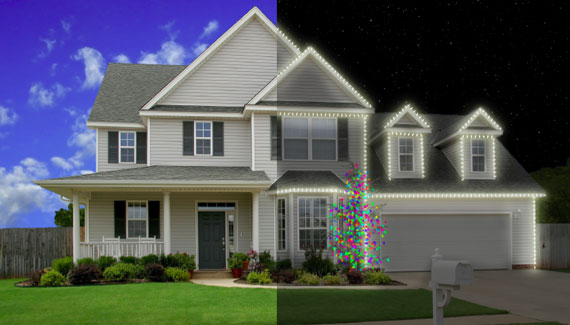
Cool I like this… Did notice that you left some Blue in, from the day time pic. to the left side of the house. though the Porch column… never the less this is a cool tutorial
can’t wain to use this.. THANKS!



Hi Corey,
I got a question, how come i can’t see the movies of the newest tutorials but i can from older tutorials? But keep up the good work, gives me alot of inspiration.
Thanks,
Thomas
OH! it is a very help tutorials. I have knowledge about design. But it is my dream house. Thanks for the sharing.
WOW, very cool Tutorial 🙂
Thanks Corey, great lesson
Merry Christmas
Congratulations Corey Another Triumph. Those lights truly Pop
Thanks for the tuts this year, they have been a real inspiration.
Happy Christmas and New Year
Thanks! Amazing tutorial!
Corey, your tutorial made my day. Thank you so much.
nice job 😉
Nice one !
Simple and effective. Thanks!
What a talent you have Corey! You are my inspiration to improve my artistic skills.
Corey you are a very talented artist. Great tutorial.
Fantastic tutorial, can’t wait to give it a shot!!
Corey, can you come over and paint Christmas lights on my house?
Very cool Corey!….Happy Holidays!
Real fun tutorial, really made my day. I definitely plan on doing this with my house. I am then going to e-mail the touched up photo to friends and family, and I know they will have to do a drive by, because they know how lazy I am, and they are going to want to see if it is in fact real or not. Thanks for the Christmas present. Your the best.
loved the way you did the stars.. maybe a little more then the lights 🙂
I thought I was a creative guy!! Looks like I need some work! Great Job!!!
Merry Christmas Corey. Many thanks for your tutorials throughout the year 🙂
Fantastic tutorial!
This really rocks!
Have nice holidays!
great tutorial.. thanks for sharing. Merry Christmas
What photoshop did you you use?
Thanks
Adam
hi
my name is prashant
i am indian
my english is not good
but i understand english
i love photoshop and your work in photoshop is so good
Great stuff once again!
Corey im just 11 because of you i will not have this artistic skills
merry christmas and happy new year!
I’m just sitting here with my mouth open….WOW! Let see, get husbands laptop, find a 3D image of a cool house and try to follow along and do that on MY pc in photoshop. Cool, cool, cool!
Thanks for sharing.
Excellant
Excellent !!
Picked up a few ideas and tricks. It’s cool to see a felow artist put things together in a different way. As they say, there is more than one way to photoshop a cat 🙂
thats pretty gangster! if only i saw that around christmas!!!! oh well we got next year! awesome idea!
hi ….
its is a great tutorials
but it will great if you mail this video
plzzzzzzzzzzzzzz
Being a senior citizen, Very happy i came upon your site (Via Dpreview forums) enjoy the tutorials makes life easier thru Photoshop for me.. Thanks
THIS IS SO COOL OMG!!!
WOW this changed your life. Thats both sad and pathetic:)
Completely awesome…. the lesson is great!!!! was wondering how to do color lights…then BAM.. colored lights…. SWEEEET!!!! Now, I can show my clients and new customers what their house will look like when we decorate for Christmas or for parties.. thank you so much!!!!
Cant wait to see and learn more!
Cool I like this… Did notice that you left some Blue in, from the day time pic. to the left side of the house. though the Porch column… never the less this is a cool tutorial
can’t wain to use this.. THANKS!
well tutorial.
http://nextbarisal.com/english/graphic_design.php
Excellent videos. i like your teching style. but your video is not clear .. any way nice job keep it up..thanks
These tuts are great, but it woukd be nice to be able to download and save them for future reference.
I’m a Real Estate Photographer and I’m SO going to use this to make Christmas cards for my clients this year! Awesome Tut. Thanks! Tweeting this now…
FOr some reason this wont play and I dont think it is the computer.
nice video but u shud but some text in the video to help with applying the video
Fantastic tutorial, this would be great for Christmas cards.